
September 14, 2016
Table of contents
We have a huge round of feature updates for you all this time around!
Bulk Scheduling Confirmations
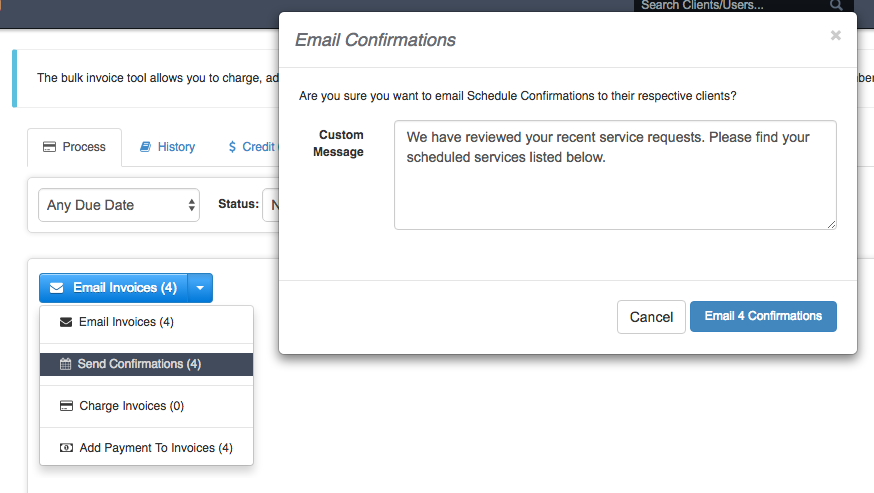
You can charge cards in bulk, email invoices in bulk and now you can send schedule confirmations in bulk!
Just as if you manually loaded each Invoice on the Scheduler and clicked "Send Confirmation" thirty times, you can now do this in a fraction of the time thanks to Bulk Confirmations. To get started head on over to Bulk Invoicing.
Automatic Tips
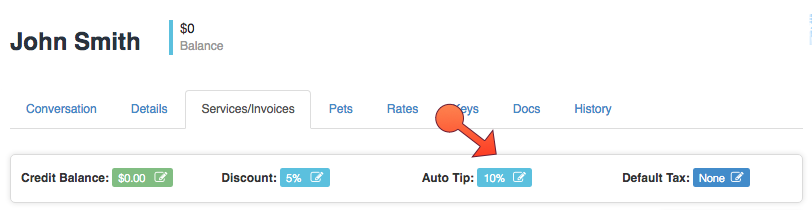
It is now possible to configure an automatic tip on each Client's account that will be calculated and applied to each Invoice for that Client.
Automatic tips can be set as either flat $ amount or a %. This is configurable from the Services/Invoices tab on each Client's profile.
Improved Client Reporting
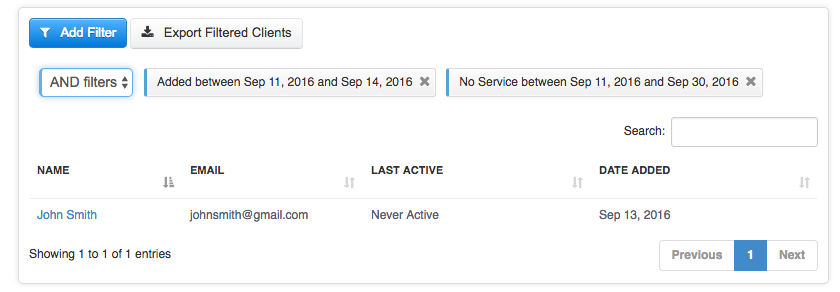
Client Reporting has been drastically improved allowing for even greater flexibility in segmenting clients. Filters can now be combined in a multitude of ways.
Want to generate a list of all clients that were added to Time To Pet on September 12, 2016, have not yet activated their portal AND have a credit balance? No problem!
This advanced functionality has also been carried over to Mass Emailing Of Clients to give even more flexibility when generating your mailing lists.
Checkout the new help article for more details:Client Reporting
Smaller (but no less important) Upgrades
- The terminology surrounding the act of "Rejecting" a client's service request has been changed to the friendlier "Unavailable" nomenclature.
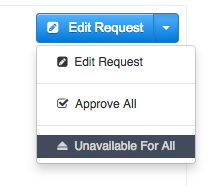
- You can now mark all pending requests as "Unavailable" in one fell swoop, just like you can "Approve All".
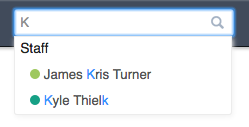
- Staff Scheduling Colors are now visible in the Staff List and the Staff Search Results in the top bar.
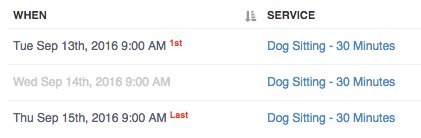
- When generating pay stubs and when reviewing events of the current Invoice on the scheduler, Cancelled events will be greyed out.
- New Client Reporting Filter "Clients With Past Due Balance".
- New Client Reporting Filter "Clients With Specified Referral Source".
- New Client Reporting Filter "Clients added to Time To Pet within specified date range."