March 10, 2017
Friday Feature Focus - Allow Clients to Create Accounts


What's the best way to grow your business? Well that is signing up new clients of course! Time To Pet makes that easy with a customizable "New Client" form that you can add to your website!
The New Client Form can be found in Portal Settings. It is the "Allow Clients To Create Accounts" option. Just be sure you have set a Client Portal Tag in Company Settings prior to turning this feature on.
After setting your "Allow Clients To Create Accounts?" option to "Yes" --- Time To Pet will show you a custom form that you can edit for new clients. If you want to make sure the client is in your city or find out where they heard about you --- you can add those fields here:
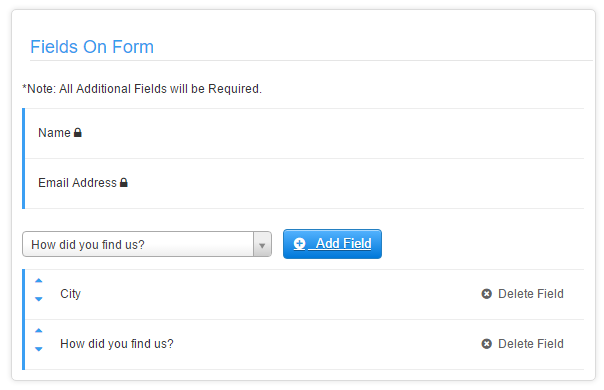
Keep in mind that you can only collect information found in the "Client Details" section of Time To Pet and all fields listed will be required.
After you've customized your form --- Time To Pet will give you a new link you can add to your website underneath a "New Client" button:

When a client clicks on this link --- they will be taken to your New Client form. They can complete the information, add an optional message and submit:
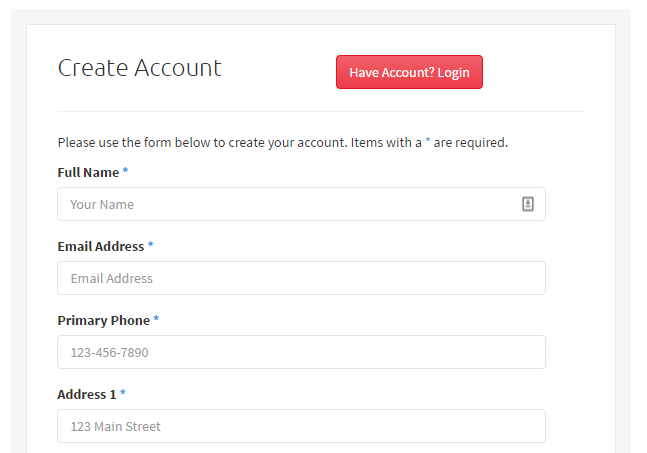
When a new client submits your form --- you will be notified and you can review/approve that new client in the Approvals section. Growing your business is that easy!
All-in-one pet care software trusted by 5,000+ businesses worldwide.