May 26, 2017
Friday Feature Focus - Custom Staff Rates


Like with any business --- you probably don't pay all of your staff members the same amount. You may offer a 10% raise to your team after they've been with you for a year or you may have "Field Managers" who make a little more than regular staff.
If you use the internal Pay Stubs or Staff Invoices tool in Time To Pet --- you may be wondering "How am I going to be able to track all of this?" Well don't worry --- we've got you covered! The answer is by using Custom Staff Rates!
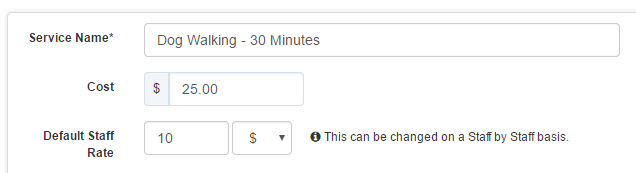
When creating a new service in Time To Pet --- you'll select your "Default Staff Rate". This is the default amount you pay your staff member for a particular visit. It can either be a percentage of what you charge the client or it can be a flat amount.
For your staff members that have rates that are different from your default rate --- you can adjust that right on their staff profile under the "Rates" tab.
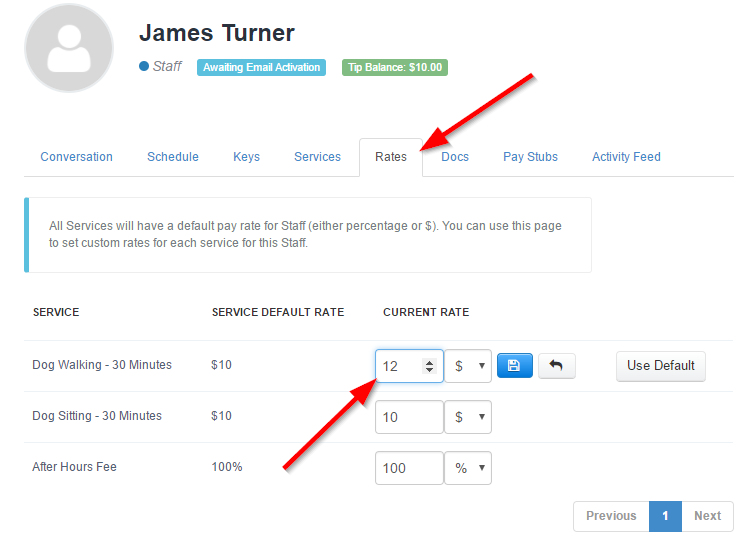
After setting your custom rates --- Time To Pet will always use these custom rates when generating new Staff Invoices or Pay Stubs for that team member. No need to take out your calculator or open up a spreadsheet! We do the math for you!
All-in-one pet care software trusted by 5,000+ businesses worldwide.