August 5, 2016
Table of contents
One of our main goals here at Time To Pet is to give our clients the ability to customize their system to meet their business needs. We quickly understood that no two businesses are the same and it’s not just the information each business collects. One pet sitting company may want to share all of their client information with their staff while another may only want to share the relevant information. Our solution was to allow client fields to either be “Staff Visible” or “Staff Invisible”.
What does that mean you ask? Well — it’s actually quite simple. “Staff Visible” means your staff are able to see that piece of information about your client (including on our web application and on the mobile applications). For example, your staff members always need to be able to see the client’s address:

But you may not want to share the client’s phone number with your team:

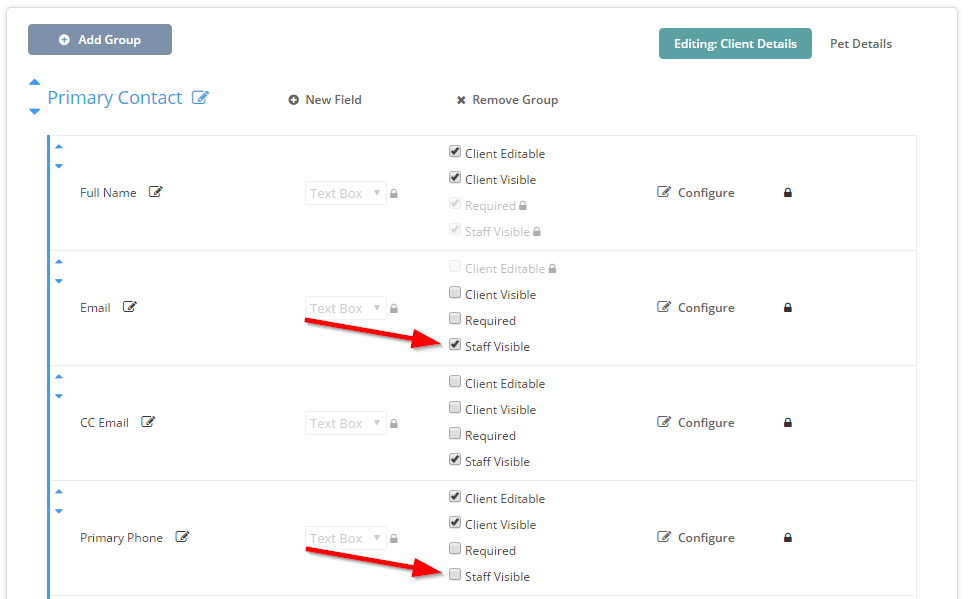
The ability to set certain fields as “Staff Visible” or “Staff Invisible” really helps customize your Time To Pet system to meet your business needs. To change the “Visibility” of certain fields — you can navigate directly to the Custom Fields section. Each field has a set of checkboxes. One of them includes “Staff Visible”. When checked — staff members are able to see this data. When unchecked — staff members are not.