June 16, 2017
Friday Feature Focus - Visits Report


Having a strong grasp on your data is essential for understanding your business. In Time To Pet --- you have access to lots of different reports to help you gather this data. Today, we will take a closer look at the Visits Report.
The Visits Report allows you to run some really custom reports based on all the visits in your system. These reports can be customized based on a range of time, the client, the staff, the type of service and the status of the event. Want to run a report for dog walking visits last month for one of your customers completed by one staff member? That's a breeze with Visit Reports!
Visit Reports can be found under the Visits tab in Reporting:
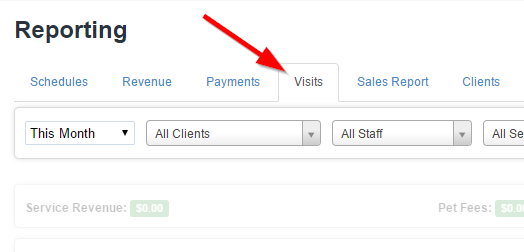
You can set all of your toggles at the top of the screen. These include a date range, a client drop down, staff members, your services and the status of these events. We will run a report for 30 Minute Dog Walking services completed by our staff James Turner last month:

After setting your filters, select the "Generate" button:
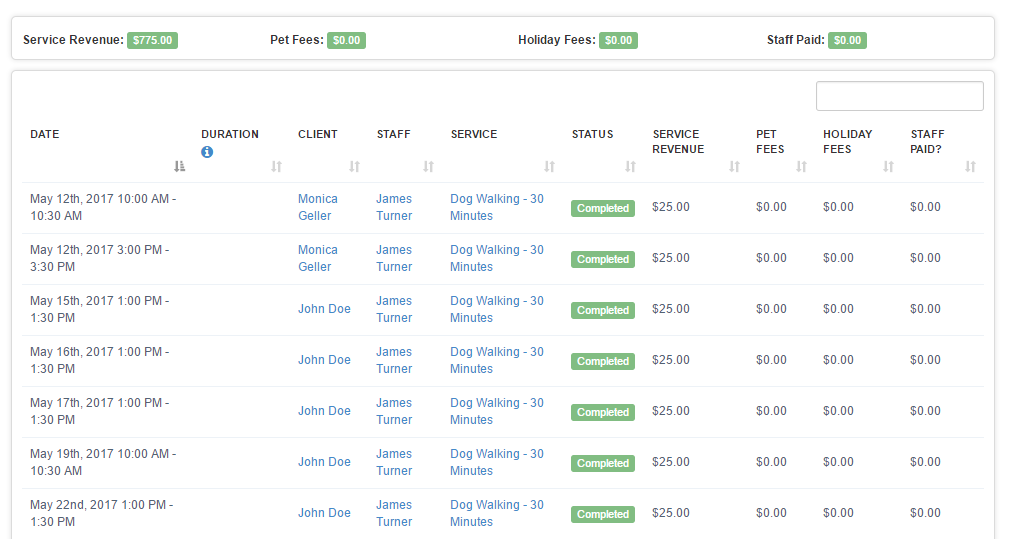
You can see a breakdown of Service Revenue, Pet Fees, Holiday Fees and if you paid your staff for these visits at the top. The bottom will give you a complete list of all events that match your filter settings. You can also download this report as a spreadsheet if you need to!
All-in-one pet care software trusted by 5,000+ businesses worldwide.