
November 18, 2015
Table of contents
We have some more great new features to highlight today in addition the features highlighted on Monday. We will be announcing more this Friday as well!
Late Service Reminders

Late services reminders allow you to be notified via email when a visit has not been completed on time. The reminder will be sent to all administrators and the staff member assigned to the event.
Reminders are configured on a service by service basis to account for the different levels of acceptable deviation in various services. Look for the “Late Reminder” option. Reminders can be sent at any time interval after the service start or end time.
Schedule Blocks on Calendar
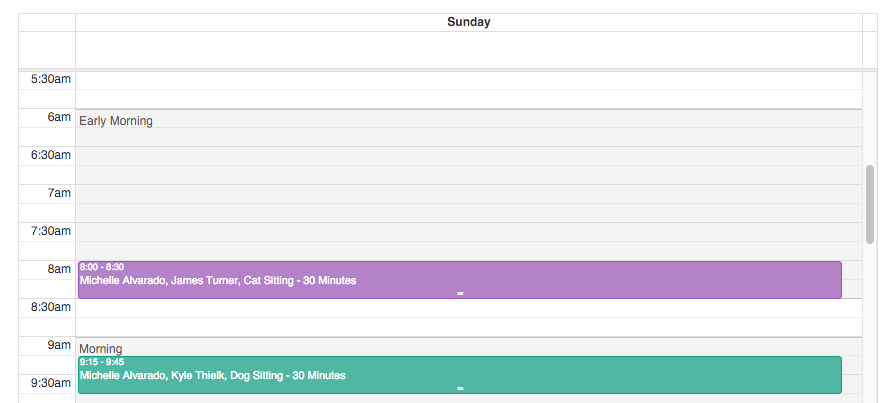
It is now possible to display your Schedule Blocks on the main company calendar! Easily see at a glance how your scheduled services fit within your pre-defined Schedule Blocks.
To enable this feature visit the Settings -> Scheduler tab and look for the option labelled “Show Schedule Blocks”.
Once A Day Holiday Rates
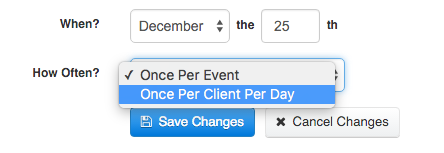
Previously automatic holiday rates were added for each event scheduled for a client on the holiday. We heard from many of you that you only charge a holiday fee once per day irregardless of how many events a client may have scheduled.
Holiday Rates can now be configured to only charge a client once for the day, even if they have multiple events.
When editing a Holiday there is a new option labelled “How Often?” that allows you to specify the behavior that works for your company.