
June 4, 2015
Table of contents
A last minute request for services has the potential to cause confusion and stress for both your staff members and your clients. It is important as a Pet Service Business to provide the best service possible and last minute requests make that very difficult. In most cases a human touch is required.
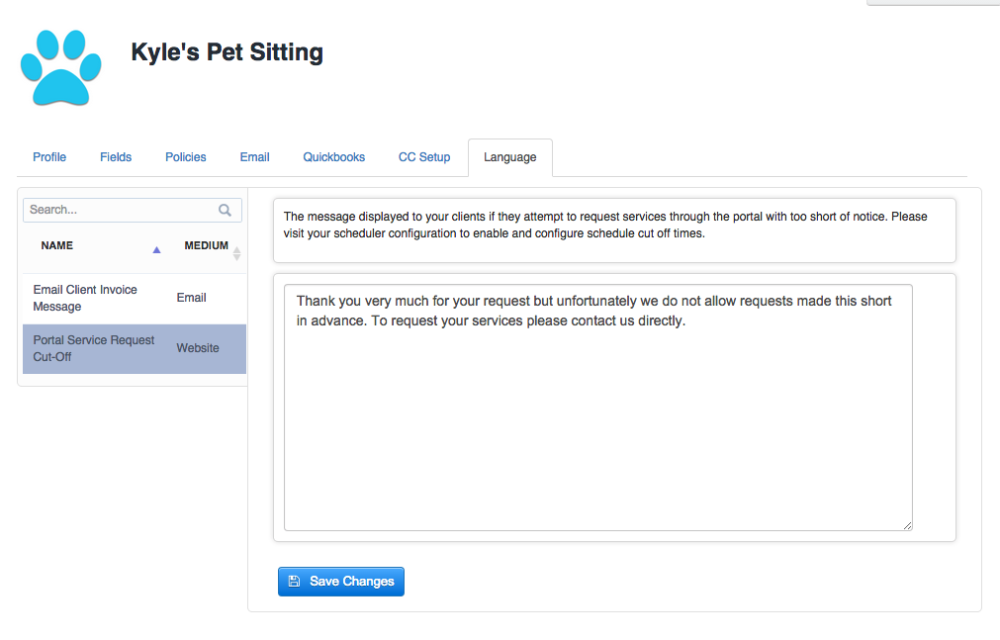
Fortunately Time To Pet makes it very easy to prevent last minute requests through the Client Portal and allows you to configure a custom message that the Client receives when making a request with not enough notice.
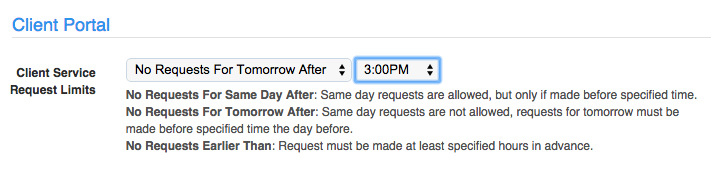
Configuring Client Portal Cut Off Times
- Visit your Scheduler.
- Click on the Configure tab.
- Find the option labelled “Portal Cut Off Times”.
Configuring Custom Cut Off Message
- Visit your Company Configuration and click on the “Language” tab.
- Select the message labelled “Portal Service Request Cut-Off”.
For more information and a detailed description of each option please visit our knowledge base article: Portal Cut Off Times